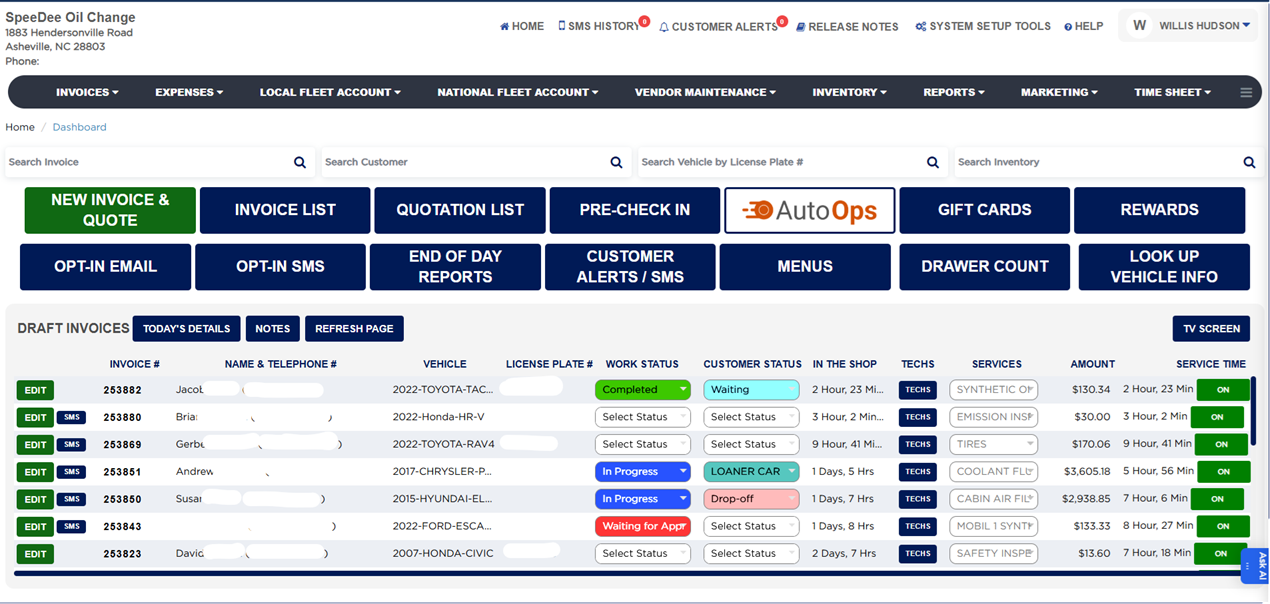
How do I navigate the Home Screen? #
- Click HOME in the top bar to return to the dashboard at any time.
- Use the top utility bar for SMS HISTORY, CUSTOMER ALERTS, RELEASE NOTES, SYSTEM SETUP TOOLS, and HELP.
- Use the main menu bar for INVOICES, EXPENSES, LOCAL FLEET ACCOUNT, NATIONAL FLEET ACCOUNT, VENDOR MAINTENANCE, INVENTORY, REPORTS, MARKETING, and TIME SHEET (each is a dropdown).
- Your shop name, address, and phone appear at the top left; the logged-in user appears at the top right.