ARM Help ›
Home Screen Overview ›
Main Menu Bar
Main Menu Bar
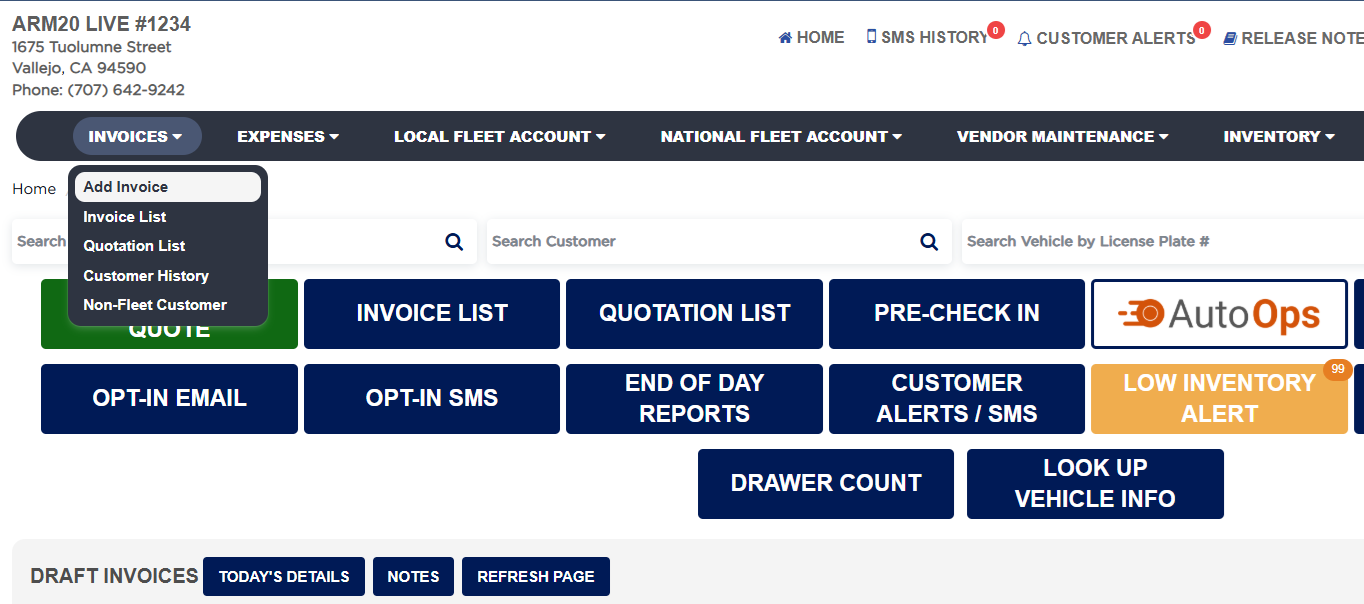
The dark menu bar runs across the Home Screen and gives dropdown access to ARM’s main areas. Each item opens its own feature; use this as the map to the rest of the program.
What does each main menu item do?
#
INVOICES — add an invoice and open the invoice list (also available as Home buttons).
EXPENSES — enter shop expenses and paid-outs, including outside part purchases (OPP).
LOCAL FLEET ACCOUNT / NATIONAL FLEET ACCOUNT — manage fleet customer accounts.
VENDOR MAINTENANCE — set up your vendors and suppliers.
INVENTORY — set up inventory vendors and categories, order parts, view your parts, and open inventory reports.
REPORTS — access all reports in ARM.
MARKETING — send customer reminders such as recommendation reminders, oil-change reminders, and other standard reminders.
TIME SHEET — add and edit employees, enter and adjust employee time, and view time-related reports.
Main menu bar with dropdowns expanded
Draft Invoices List
People also ask
edit top menu bar next menue
asked 1× edit top menu bar
asked 1×