ARM Help

Employee PIN Management

Each employee is assigned a unique four-digit PIN for timesheet entry. PINs can be created, reset, or emailed to employees. Changes may require entering the current PIN.

1 how-to answer 1 screenshot Open in ARM Markdown

How do I reset an employee's PIN? #

  1. Log in as the Owner or Technician.
  2. Temporarily reassign the employee’s email to yourself.
  3. Send the reset link to your email.
  4. Wait for the employee to receive the reset link and update their PIN.
  5. Restore the employee’s original email after the PIN has been updated.
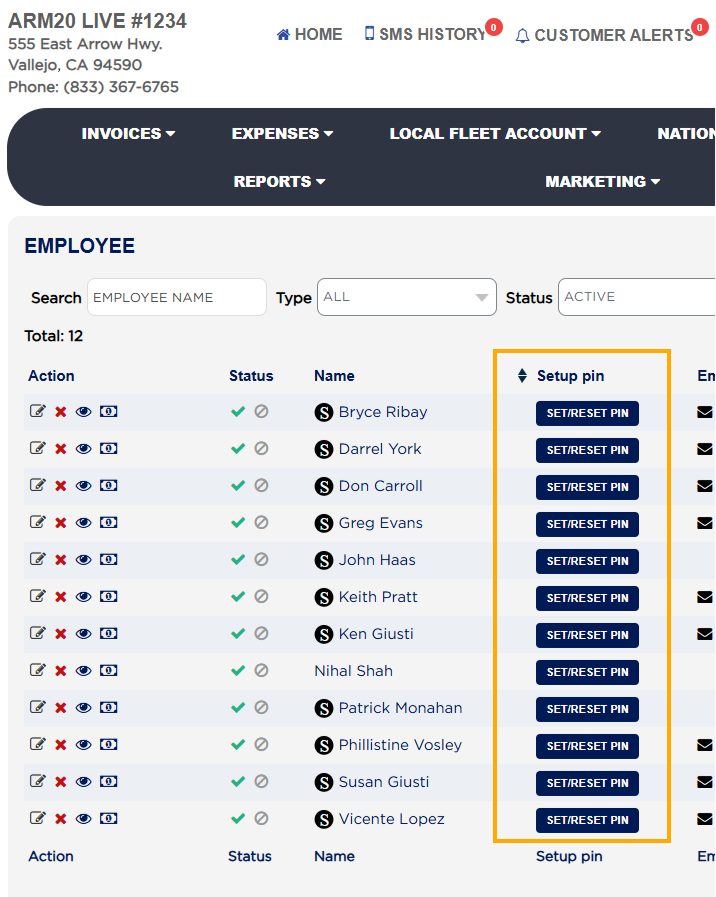
PIN reset by owner using email reassignment
About this screen

The Owner can reset employee PINs by temporarily reassigning the employee’s email to themselves, sending the reset link, and then restoring the employee’s email after the reset. Technicians must be assigned to invoice jobs; ARM prevents finalization of invoices if no technician is assigned.

If needed, you can reset a PIN by temporarily assigning your email to the employee and sending the reset link to yourself, then restoring their email after updating.

Ask AI