ARM Help

Invoice Amount Details

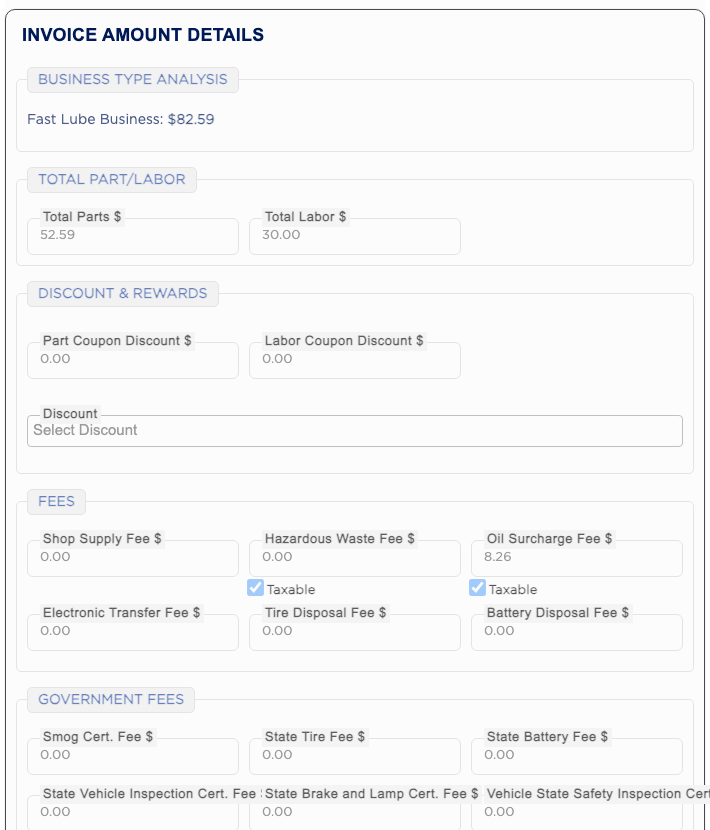
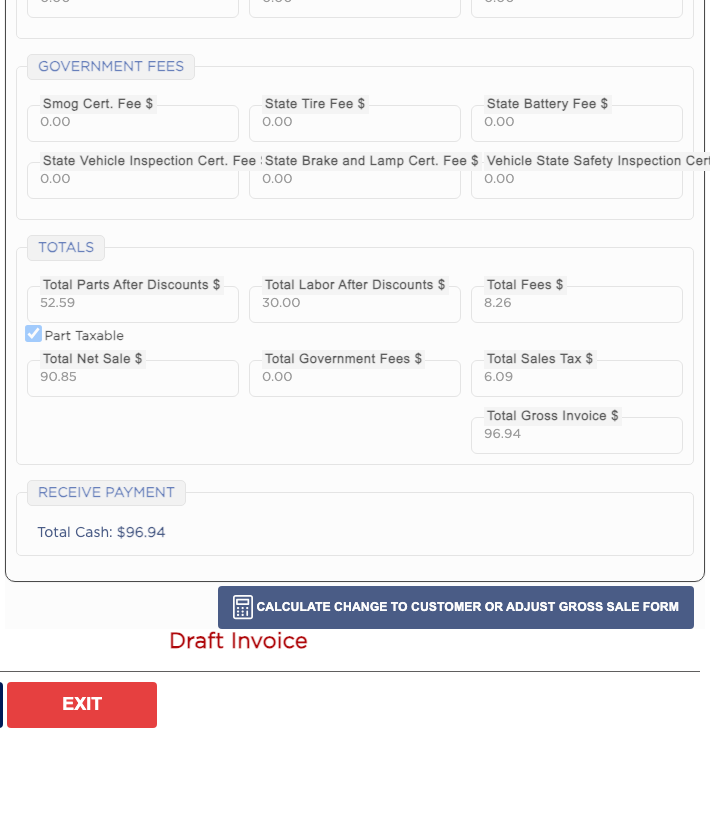
INVOICE AMOUNT DETAILS, at the bottom of the right side, is where the invoice total is worked out. Business Type Analysis splits the sale by business type. Total Part/Labor shows the parts and labor before discounts. Discount & Rewards holds coupon discounts, the group Discount list and reward points. Fees holds shop fees such as the Shop Supply Fee and Hazardous Waste Fee, which ARM fills in from each service package, and Government Fees holds state fees such as the Smog Cert. Fee. Totals shows the Total Net Sale, Total Sales Tax and the Total Gross Invoice, which is the amount the customer owes.
4 how-to answers 2 screenshots Open in ARM Markdown

How do I give the customer a discount? #

  1. From the Home Screen, click Invoices → Invoice List, open the invoice and click EDIT.
  2. Click INVOICE AMOUNT DETAILS to jump to the panel.
  3. To take an amount off, enter it in Part Coupon Discount $ or Labor Coupon Discount $. A parts discount cannot be more than the total parts, and a labor discount cannot be more than the total labor; to go lower, reduce the part prices instead.
  4. To use one of your shop's set discounts, such as Military Discount, pick it in Discount. A discount with a variable amount asks you to type the amount, and your shop may ask for a password.
  5. Click SAVE. The totals update.
Invoice Amount Details — discounts and fees
Invoice Amount Details — totals

How do I use a customer's reward points? #

  1. From the Home Screen, click Invoices → Invoice List, open the invoice and click EDIT.
  2. In Discount & Rewards, click Apply Reward. The button shows the dollar value the customer can redeem, and only appears once they have enough points.
  3. The reward is split into Reward Disc Part $ and Reward Disc Labor $.
  4. Click SAVE.

How do I change a fee on the invoice? #

  1. From the Home Screen, click Invoices → Invoice List, open the invoice and click EDIT.
  2. In Fees or Government Fees, type the new amount in the fee box, for example Shop Supply Fee $ or State Tire Fee $.
  3. The totals update straight away. The Taxable tick under a fee shows whether sales tax is charged on it; it follows the customer's tax status and cannot be changed here.
  4. Click SAVE.

How do I work out the customer's change? #

  1. From the Home Screen, click Invoices → Invoice List and open the invoice.
  2. Click CALCULATE CHANGE TO CUSTOMER OR ADJUST GROSS SALE FORM.
  3. Under Calculate Cash Back To Customer, enter what the customer is paying in Customer Paid and press Tab. ARM shows the Cash Back to Customer.
  4. To bring the total to a round figure, enter it in Change Gross Sale to $ under Adjust The Gross Sale and click Update. This is not available on a finalized invoice.

People also ask

  • asked 1×

Ask AI