ARM Help

Accessing System Setup Tools

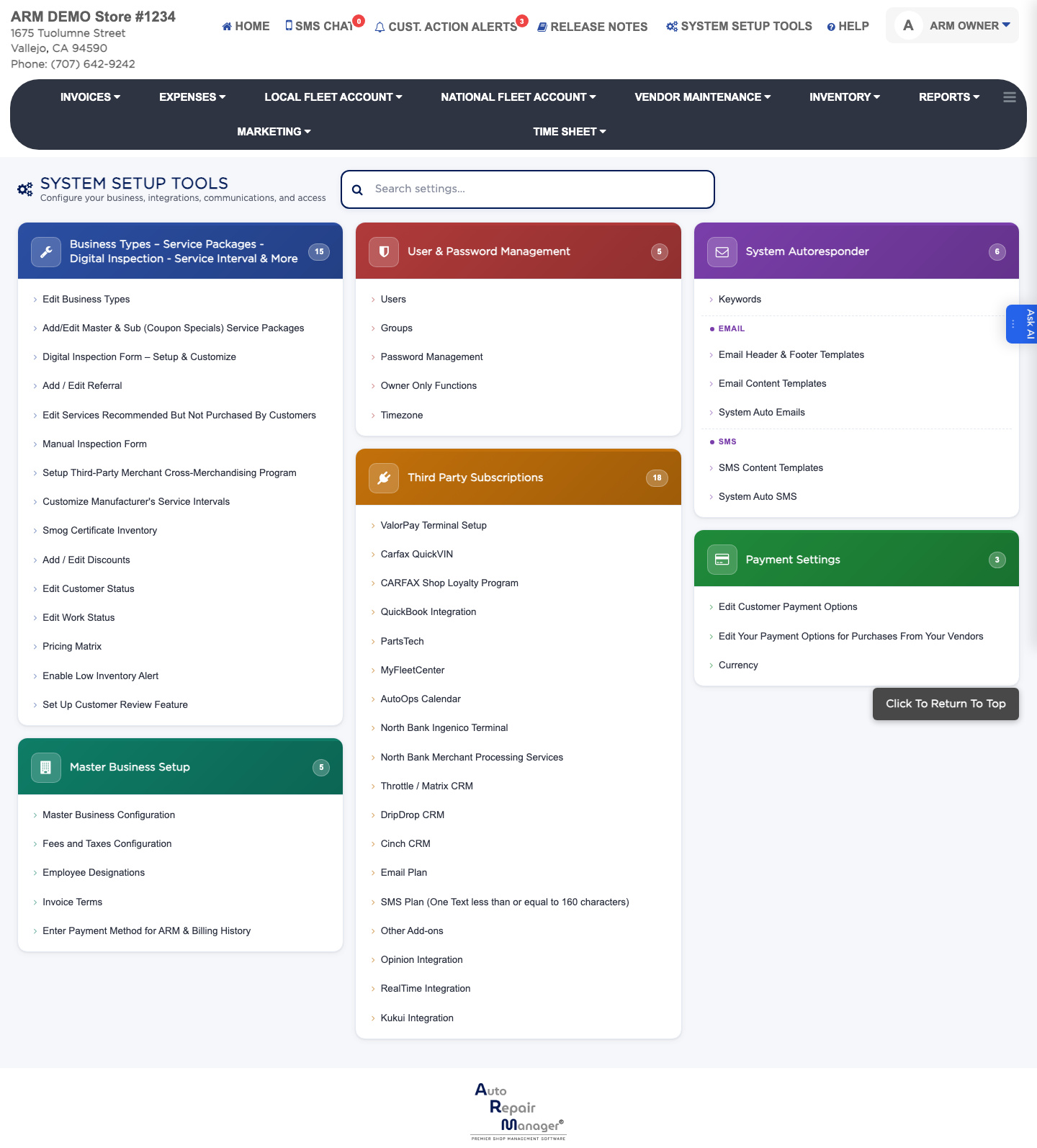
System Setup Tools is where ARM is configured: your business details, the services and packages you sell, your integrations, your automatic emails and texts, and who is allowed to do what. The screen groups every setting into six cards — Business Types – Service Packages - Digital Inspection - Service Interval & More, Master Business Setup, User & Password Management, Third Party Subscriptions, System Autoresponder and Payment Settings. What you can see here depends on your own permissions, so a shop manager sees fewer settings than an owner.
2 how-to answers 1 screenshot Open in ARM Markdown

How do I open System Setup Tools? #

  1. From the Home Screen, click System Setup Tools in the top menu bar.
  2. The settings appear as cards, each listing the screens inside it. The number on a card tells you how many settings it holds.
  3. Click any setting to open it.
System Setup Tools — the six setting groups

How do I find a setting when I don't know which card it is in? #

  1. From the Home Screen, click System Setup Tools.
  2. Type what you are looking for in the Search settings box at the top.
  3. The cards filter as you type, showing only settings whose name matches. Clear the box to see everything again.

People also ask

  • asked 1×
  • asked 1×

Ask AI