ARM Help

Fees and Taxes Configuration

Fees and Taxes Configuration holds the extra charges ARM can add to an invoice on top of parts and labor, such as shop supplies, hazardous waste and environmental fees. Like Master Business Configuration it is a set of Configuration Name and Configuration Value rows you edit one at a time. Set these up once and every new invoice applies them automatically.

2 how-to answers 1 screenshot Open in ARM Markdown

How do I set up a shop fee? #

  1. From the Home Screen, click System Setup Tools → Fees and Taxes Configuration.
  2. Find the fee you want in the Configuration Name column.
  3. Click Edit in the Action column beside it.
  4. Enter the Configuration Value — the amount or the percentage the fee should charge.
  5. Click Edit to save. The fee applies to invoices created from then on.
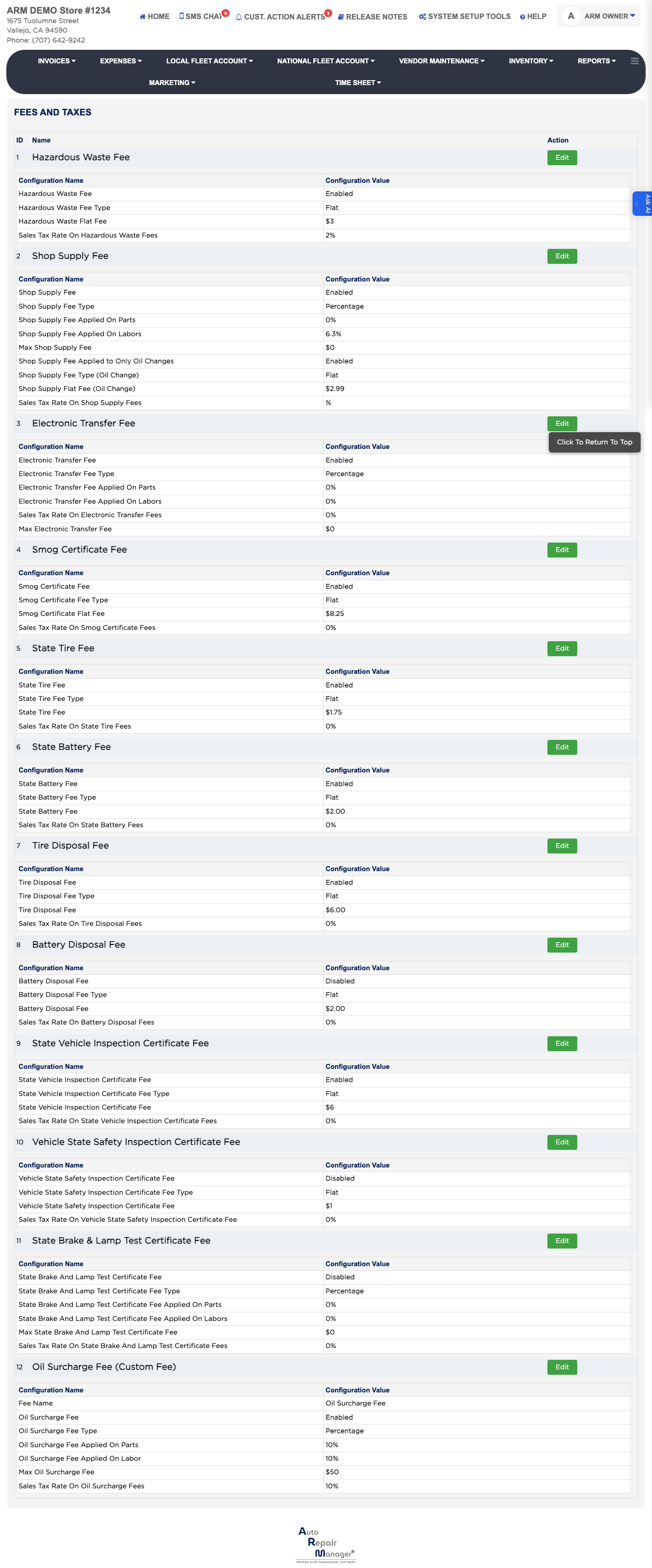
Fees and Taxes Configuration

How do I stop charging a fee? #

  1. From the Home Screen, click System Setup Tools → Fees and Taxes Configuration.
  2. Click Edit beside the fee in the Action column.
  3. Set the Configuration Value to 0 so the fee stops being added, rather than looking for a way to delete it.
  4. Click Edit to save.

Ask AI