ARM Help

End of Day Report

The End of Day Report (its heading reads END OF DAY REPORT) is not a report of its own but the closing checklist for the day: one page where you pick the date and tick which of the day's reports you want, and ARM opens each one as a PDF in its own tab. It gathers the reports a shop prints when it closes, the cash and deposit reconciliation, the day's sales by payment method, the vital statistics, the outside part purchases and paid-outs, the daily management figures and the weekly sales journal, so nobody has to open seven reports one at a time. Use it at closing to print the day's paperwork in one go, and the next morning to reprint any of it for the bookkeeper.

2 how-to answers 2 screenshots Open in ARM Markdown

How do I print the end of day reports? #

  1. From the Home Screen, click Reports → Management & Operational Reports → End of Day Report.
  2. Click the From : … To : … date box and pick the day you are closing as both dates. The page opens on today. The × beside the box clears the dates.
  3. Tick the reports you want: END OF DAY REPORTS, DAILY DEPOSIT REPORT, DETAILED SALES AND PAYMENT METHOD REPORT, DAILY VITAL STATISTICS REPORT, DAILY OPP & SHOP PAID OUT EXPENSE REPORT, DAILY MANAGEMENT and WEEKLY SALES JOURNAL. If none is ticked the page asks you to select at least one report.
  4. Click Open PDFs. Each ticked report opens as a PDF in a new browser tab for the chosen dates. If your browser blocks pop-ups, allow them for this site so every tab opens.
  5. Print or save each PDF from its tab.
End of Day Report date and report checklist
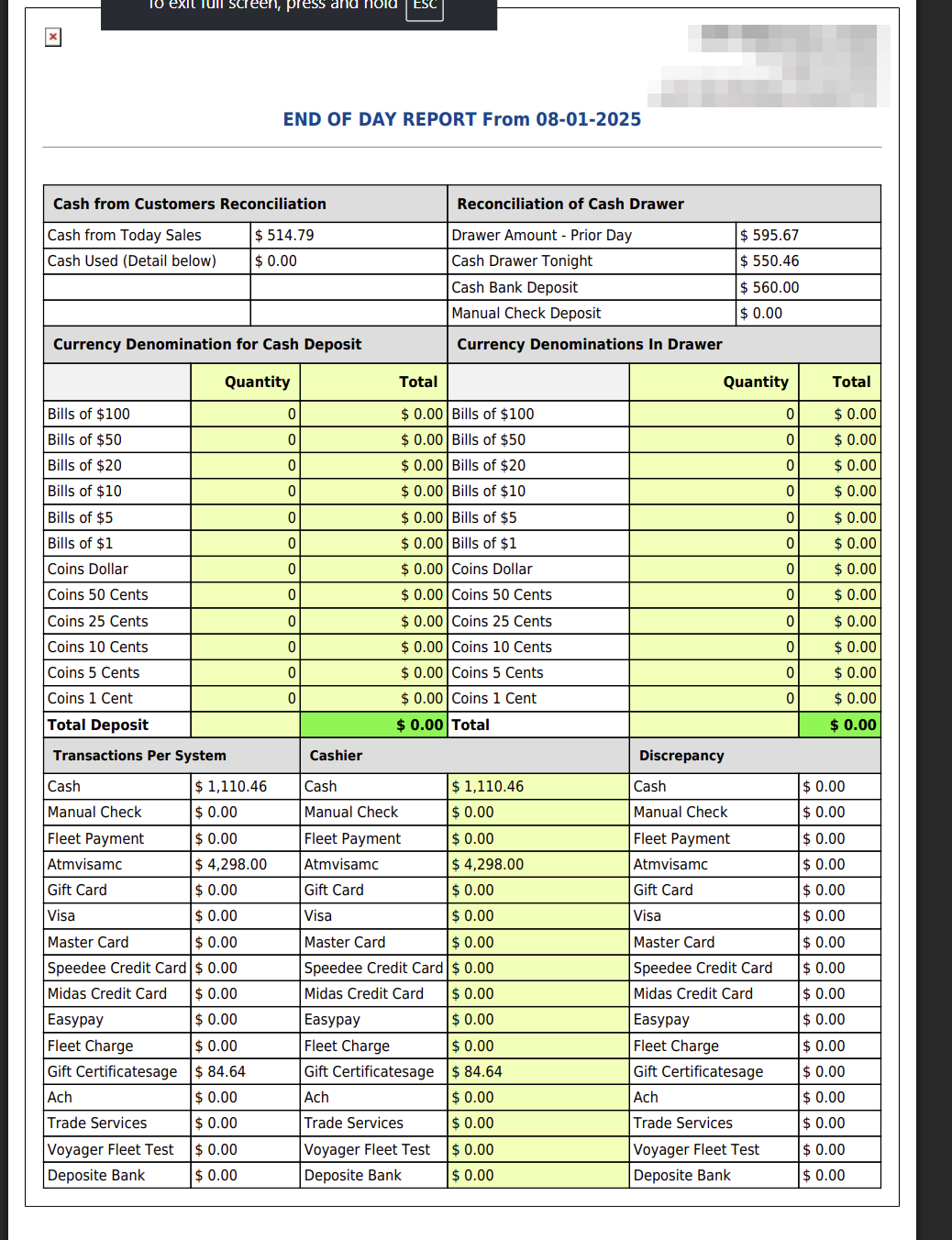
END OF DAY REPORTS PDF cash reconciliation page

How do I reprint yesterday's closing reports? #

  1. From the Home Screen, click Reports → Management & Operational Reports → End of Day Report.
  2. Click the From : … To : … date box, choose Yesterday from the list on the left, and click Apply.
  3. Tick the reports you need and click Open PDFs.
About this screen

END OF DAY REPORTS is the combined closing pack for the single day in From: it prints the Cash from Customers Reconciliation and Reconciliation of Cash Drawer with the currency count for the deposit and for the drawer and the Total Deposit, followed by Transactions Per System, Cashier and Discrepancy, which set what ARM recorded for each payment method against what the cashier counted and show the difference, then the payments received that day grouped by Payment Method (invoice number, payment, check or card number and total invoice amount), the refunds given grouped by Refund Payment Method, and the day's expenses: outside part purchases (OPP) by supplier, Daily Shop Paid Outs and Recurring Expenses, each with a total by payment method. DAILY DEPOSIT REPORT is the Daily Sales & Deposit Summary Report for the From date. DETAILED SALES AND PAYMENT METHOD REPORT is the Detailed Sales / Payment Method Report (Finalized Invoices) for the date range, one line per finalized invoice split across the payment methods. DAILY VITAL STATISTICS REPORT is the Vital Statistics (Finalized) Report for the range. DAILY OPP & SHOP PAID OUT EXPENSE REPORT is the Daily OPP and Shop Paid Outs Report for the range, listing the outside part purchases and paid-outs entered in Expenses. DAILY MANAGEMENT is the Daily Management Report for the From date, and WEEKLY SALES JOURNAL is the Weekly Sales Journal for the range. Each of these reports is described on its own screen in this module.

The page has no left report list and no Add To Favorites switch; return to the Reports page with the browser's back button or from the top menu. The End of Week, End of Month and End of Year Reports work the same way with a different set of reports. Which reports you see depends on your admin group permissions.

People also ask

  • asked 3×
  • asked 1×
  • asked 1×

Ask AI