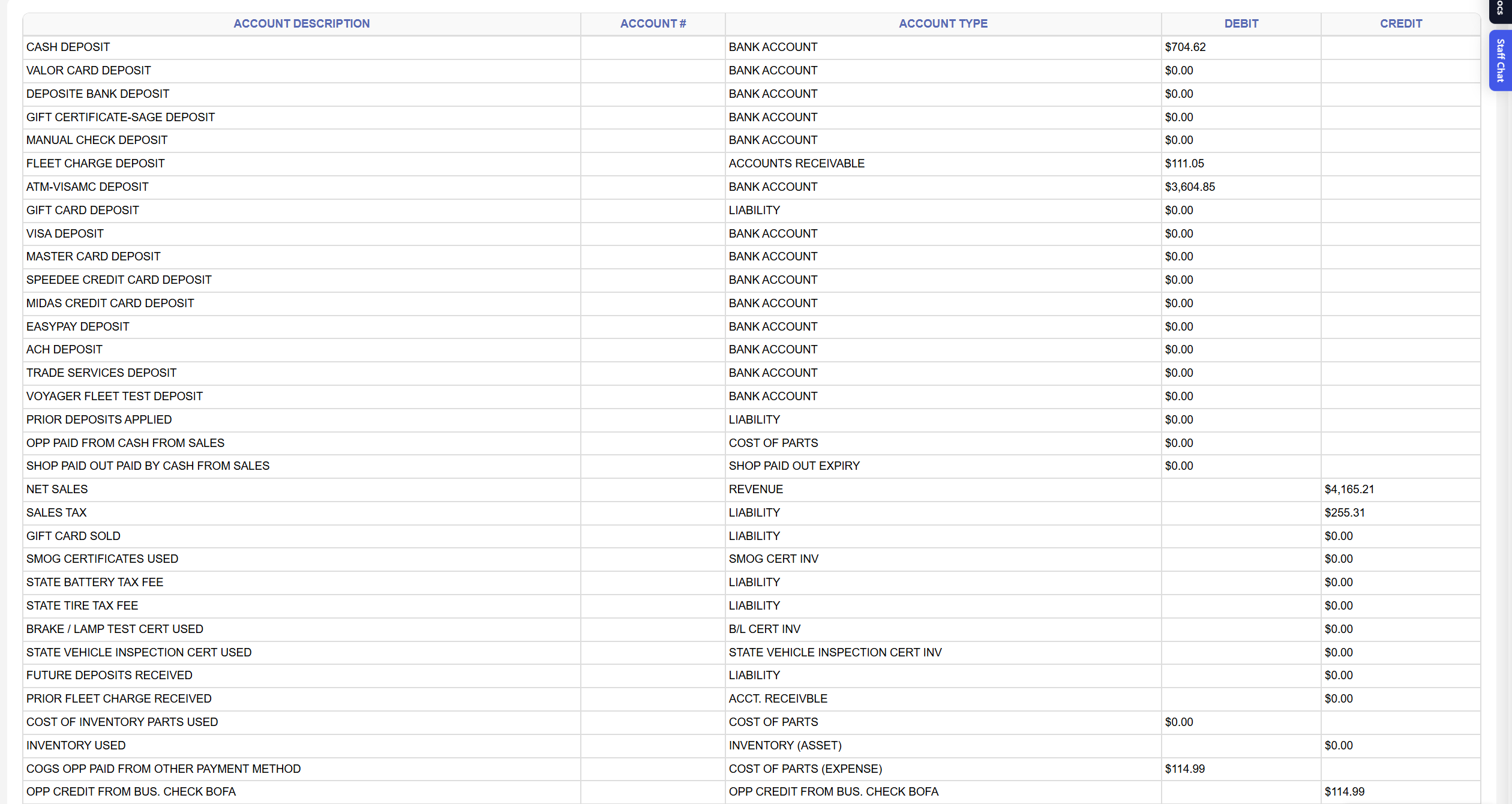
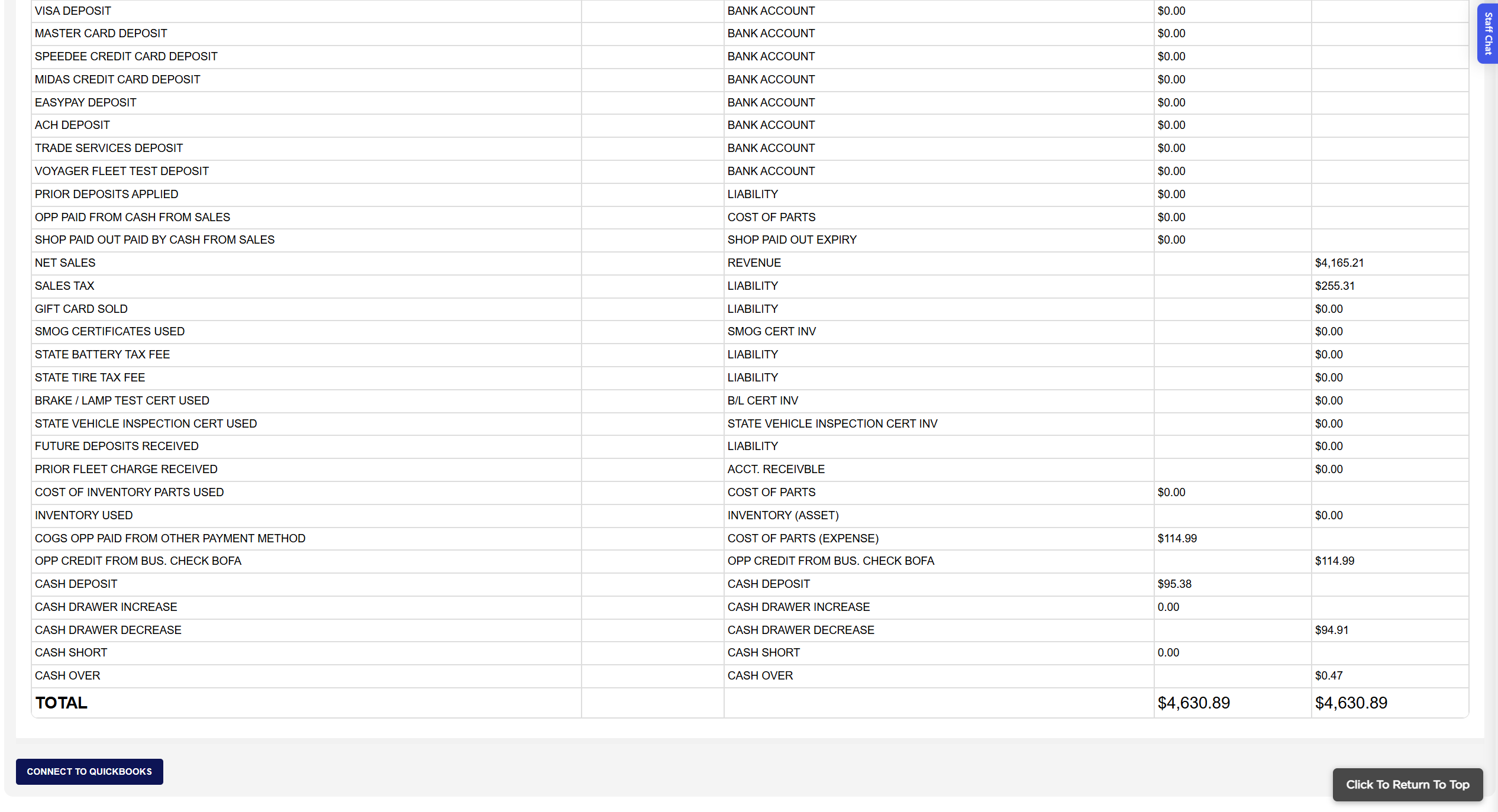
Each line shows the ACCOUNT DESCRIPTION, the ACCOUNT # (the QuickBooks account the line is mapped to, filled in only while connected), the ACCOUNT TYPE (the kind of account the line belongs in, such as BANK ACCOUNT, REVENUE or LIABILITY) and the amount under DEBIT or CREDIT. The debit lines are the money that came in and the cash that went out: CASH DEPOSIT is the cash collected that day less the outside part purchases, shop paid-outs, parts and oil bought with cash that day; one … DEPOSIT line for each other payment method your store uses, such as VISA DEPOSIT or FLEET CHARGE DEPOSIT (sales charged to fleet accounts), is the payments taken that day by that method, including deposits on open invoices, fleet account receipts and gift card sales, less refunds; PRIOR DEPOSITS APPLIED is the money taken before that day on the invoices finalized that day; OPP PAID FROM CASH FROM SALES and SHOP PAID OUT PAID BY CASH FROM SALES are the outside part purchases and paid-outs settled from the drawer. The credit lines are what the money was for: NET SALES of the invoices finalized that day less refunds, SALES TAX, GIFT CARD SOLD (when your store sells gift cards), SMOG CERTIFICATES USED, STATE BATTERY TAX FEE, STATE TIRE TAX FEE, BRAKE / LAMP TEST CERT USED, STATE VEHICLE INSPECTION CERT USED, FUTURE DEPOSITS RECEIVED (payments taken that day on invoices not finalized that day) and PRIOR FLEET CHARGE RECEIVED (payments received on fleet accounts). COST OF INVENTORY PARTS USED (debit) and INVENTORY USED (credit) carry the same amount, the cost of the stock parts used on the day's finalized invoices. COGS OPP PAID FROM OTHER PAYMENT METHOD (debit) and one OPP CREDIT FROM … line per purchase method (credit) record the outside parts bought for the day's invoices with a card or account rather than cash. When the day's End of Day figures have been saved from the Home Screen, extra lines appear: a second CASH DEPOSIT with the difference between the bank deposit you counted and the cash ARM expected, CASH DRAWER INCREASE or CASH DRAWER DECREASE, and CASH SHORT or CASH OVER. The TOTAL row adds each column; a line whose value is negative is shown on the opposite side. QuickBooks accepts the entry only when the two totals agree.
The screen has no Print or Download button; the record of the day is the journal entry in QuickBooks. The QuickBooks Client ID, Client Secret and Company ID that make the connection possible, and an optional QuickBooks location stamped on every line, are entered once by your administrator on the QuickBooks setup page. The Add To Favorites switch beside the heading saves the screen under Favorites on the Reports page. Which reports you see depends on your admin group permissions.