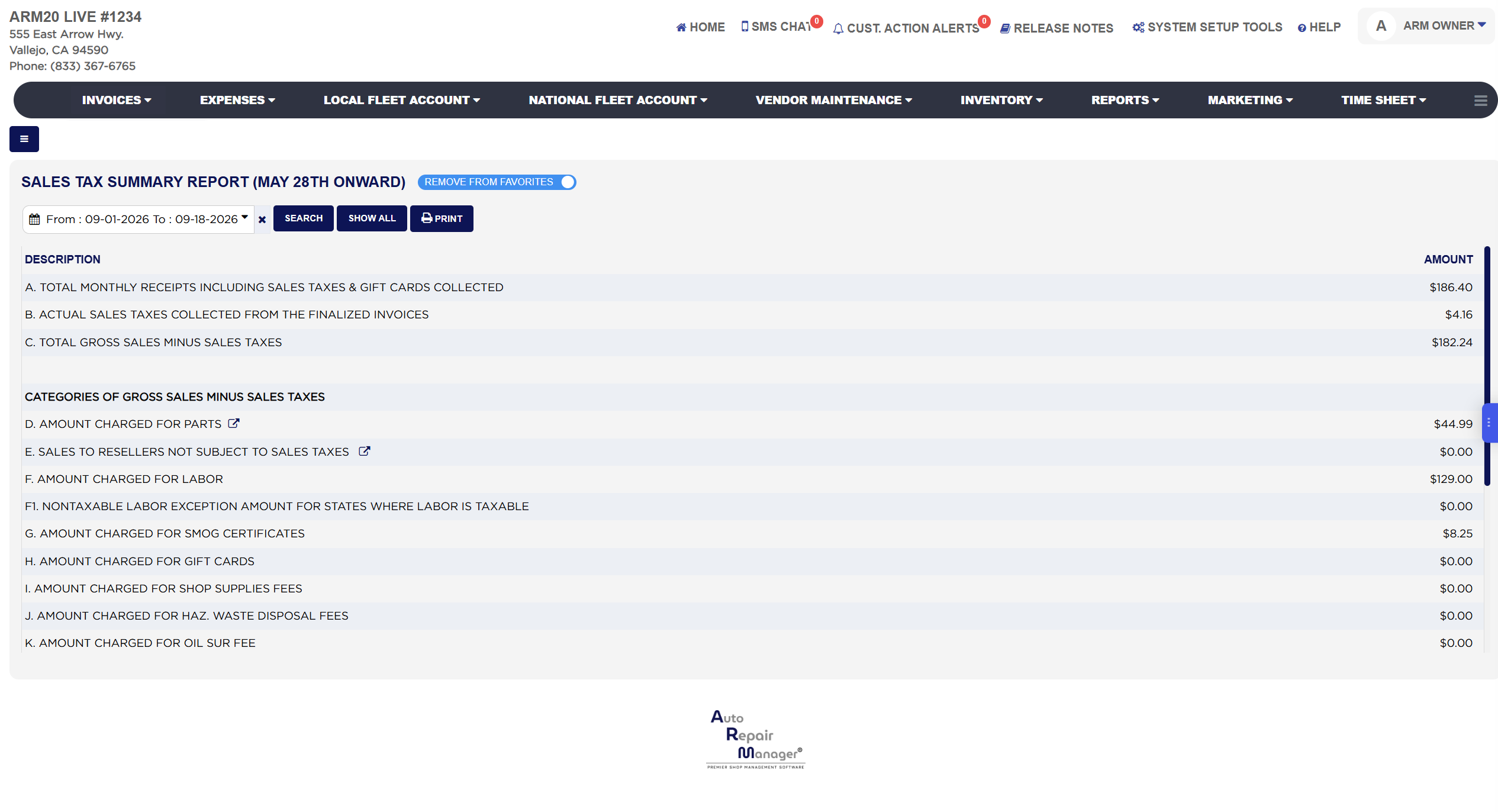
Sales Tax Summary Report (May 28th Onward)
The Sales Tax Summary Report (May 28th Onward) is the one-page summary a shop takes to its sales tax return. For the date range it shows total receipts, the sales tax actually collected, gross sales less tax, and then breaks gross sales less tax into the categories a tax return asks for: parts, sales to resellers, labor, smog certificates, gift cards and each shop and state fee, lettered A through T so the lines can be quoted. "May 28th Onward" marks the date the current tax calculation came in; for periods before that date use the Old Sales Tax Summary Report (May 28th & Prior) if your store still shows it. Use this report at month or quarter end to fill in the return, and to check that the categories add back up to gross sales.
About this screen
The first block gives the totals. A. Total Monthly Receipts Including Sales Taxes & Gift Cards Collected is everything invoiced in the range, tax and gift card sales included. B. Actual Sales Taxes Collected From The Finalized Invoices is the sales tax charged on those invoices, which is the amount you owe the state. C. Total Gross Sales Minus Sales Taxes is A less B, the sale before tax. The second block, Categories of Gross Sales Minus Sales Taxes, splits C into what a return asks for: D. Amount Charged for Parts, with an arrow icon that opens the Amount Charged for Parts invoice list for the same dates; E. Sales to Resellers Not Subject to Sales Taxes, the tax-free parts sales, with an arrow that opens the Sales To Resellers Not Subject To Sales Taxes report; F. Amount Charged for Labor, shown as Amount Taxable for Labor in states that tax labor, with F1. Nontaxable Labor Exception Amount for States Where Labor Is Taxable for labor items marked non-taxable; G. Amount Charged for Smog Certificates; H. Amount Charged for Gift Cards; I. Amount Charged for Shop Supplies Fees; J. Amount Charged for Haz. Waste Disposal Fees; K. Amount Charged for Oil Sur Fee; L. Amount Charged for Electronic Transfer Fees; M. State Tire Fee; N. Tire Disposal Fee; O. State Battery Fee; P. Battery Disposal Fee; Q. State Vehicle Inspection Cert. Fee; R. State Brake and Lamp Cert. Fee; S. Vehicle State Safety Inspection Cert. Fee; and T. Total of Categories (Sum of D Through S) Should Equal C, the check line: T and C match when every dollar of the sale has been placed in a category. A line marked Not Applicable is a category your store does not use.
The Add To Favorites switch beside the heading saves the report under Favorites on the Reports page; when the report is already a favorite it reads Remove From Favorites. Which reports you see depends on your admin group permissions.