ARM Help

New vs Repeat Customers

New vs Repeat Customers splits the invoices finalized in a period between customers visiting for the first time and customers who have been before, with the share, the number of invoices and the average ticket for each. It shows how much of your business comes from new customers and how much from returning ones, and whether either group spends more. Use it to judge how well marketing is bringing in new customers and how well you are keeping existing ones.

2 how-to answers 3 screenshots Open in ARM Markdown

How do I run New vs Repeat Customers? #

  1. From the Home Screen, click Reports → Marketing → New vs Repeat Customers.
  2. Set the date range in the From / To selector. It opens on 1 January of the current year to today. The range is matched against the date each invoice was finalized.
  3. SHOW ALL returns to the start of the year.
  4. Click PRINT for a PDF copy.
New vs Repeat Customers date range
New vs Repeat Customers printout

How do I check the figures on the report? #

  1. From the Home Screen, click Reports → Marketing → New vs Repeat Customers, and run it for your date range. Example: 01-01-2026 to 09-25-2026.
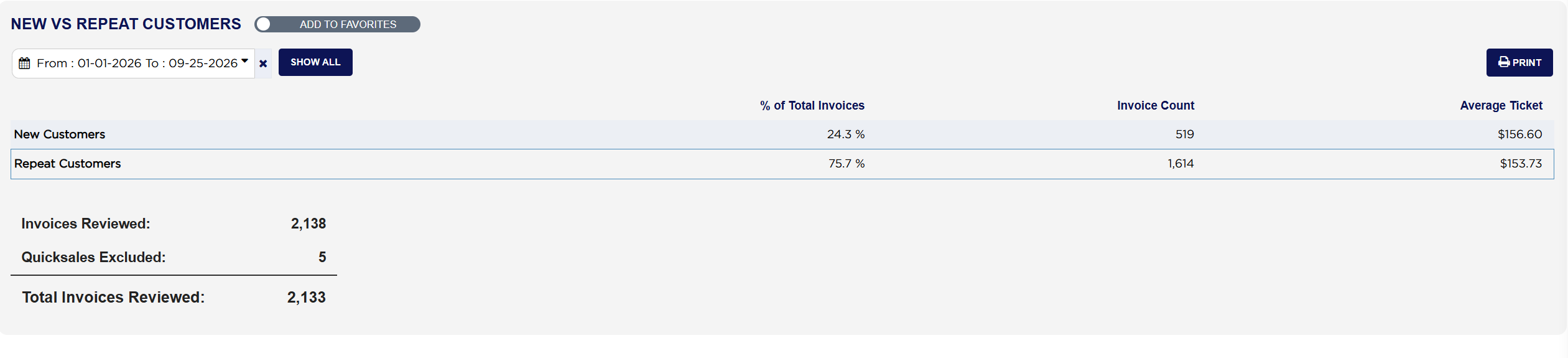
  2. Total Invoices Reviewed is Invoices Reviewed minus Quicksales Excluded. Example: 2,138 − 5 = 2,133.
  3. The two Invoice Count figures add up to it. Example: 519 new + 1,614 repeat = 2,133.
  4. % of Total Invoices is each count divided by that total. Example: 519 ÷ 2,133 = 24.3 % new, and 1,614 ÷ 2,133 = 75.7 % repeat. About one invoice in four came from a first-time customer.
  5. Compare the two Average Ticket figures. Example: $156.60 for new customers against $153.73 for repeat customers, so first visits spent slightly more.
New vs Repeat Customers table and invoice counts
About this screen

The table has two rows, New Customers and Repeat Customers, each with its % of Total Invoices, Invoice Count and Average Ticket. An invoice counts as New Customers when it is that customer's first ever finalized invoice at your store, looking back over the store's whole history in ARM, not just the dates you chose. Every later invoice for the same customer counts as Repeat Customers. Quick sales are left out, because they carry no customer. Average Ticket is the invoices' gross sales, including sales tax, divided by the number of invoices.

Under the table, Invoices Reviewed counts every invoice finalized in the period, Quicksales Excluded is the number of quick sales taken out, and Total Invoices Reviewed is what is left, the invoices the table is based on.

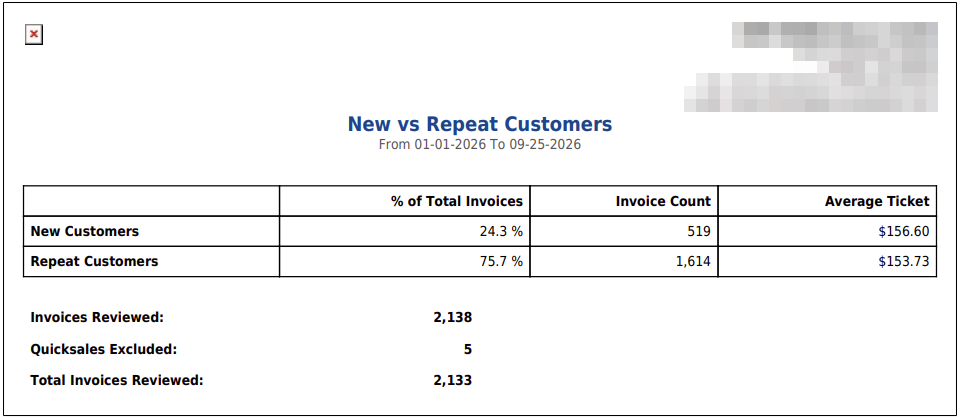
The printout is headed New vs Repeat Customers with the dates you ran, and shows the same table and counts.

A customer whose earlier visits happened before the store started using ARM counts as new on their first invoice in ARM. An invoice finalized without a customer, other than a quick sale, is counted in Total Invoices Reviewed but in neither row. For how coupons perform with first-time and repeat users, run Coupon Analysis Report.

People also ask

  • asked 1×

Ask AI