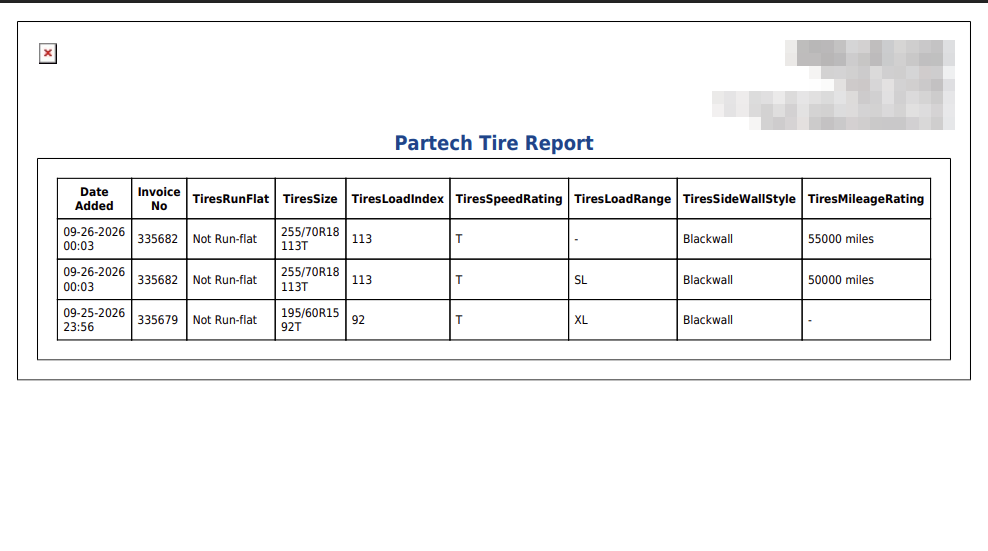
Total: above the table counts the order lines listed. Each line starts with Date Added, the date and time the tire was ordered, and the Invoice No it was ordered for. The rest of the columns are the tire details PartsTech sends with the order, headed with PartsTech's own names: TiresRunFlat (whether the tire is run-flat), TiresSize (the size and service description, such as 255/70R18 113T), TiresLoadIndex, TiresSpeedRating, TiresLoadRange (such as SL or XL), TiresSideWallStyle (such as Blackwall) and TiresMileageRating (the tread-life warranty, such as 55000 miles). A - means PartsTech sent no value for that detail on that tire.
These columns come from what PartsTech has sent for the tires your store has ordered, so another store may see a different set, and new columns can appear when PartsTech starts sending a new detail.
Each line is one order line, not one tire. The report has no quantity, so a set of four tires ordered on one line appears once. Total: is the number of order lines, not the number of tires sold. For the quantity and cost, open the line's order as described below.
Only tires ordered from an invoice are listed. A tire bought through PartsTech without an invoice appears on PartsTech Orders Report but not here.
The printout is headed Partech Tire Report and lists the same columns and lines as the screen, with the real invoice numbers.
To see all parts ordered through PartsTech, tires included, with their costs, run PartsTech Orders Report.