ARM Help

End of Year Report

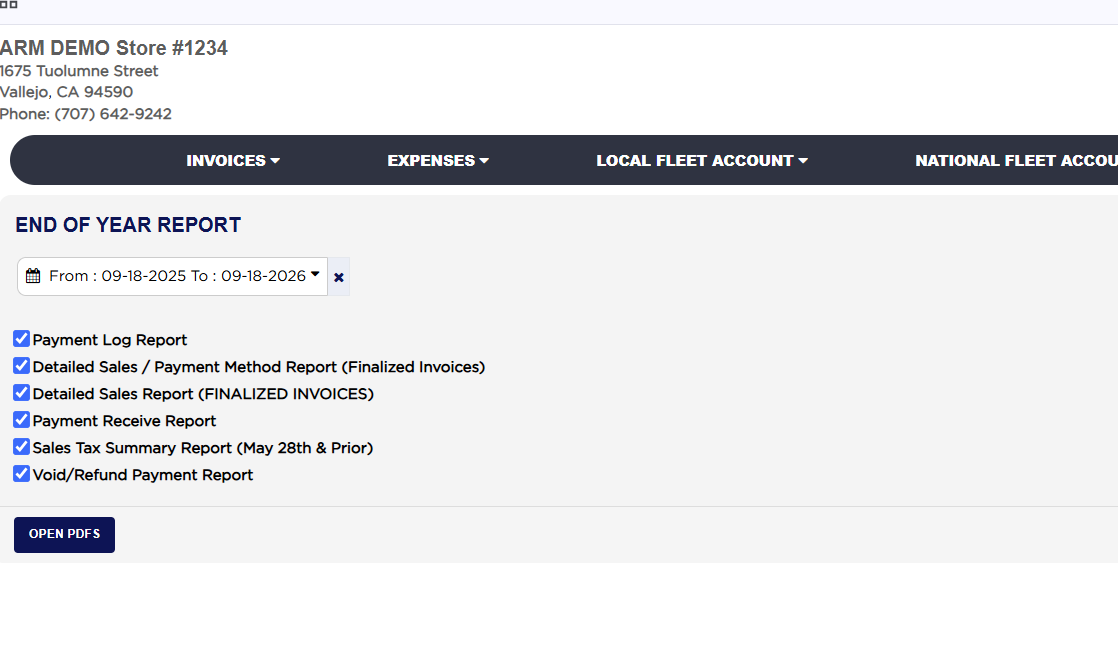
The End of Year Report (its heading reads END OF YEAR REPORT) is not a report of its own but the closing checklist for the year: one page where you set the date range and tick which reports you want, and ARM opens each one as a PDF in its own tab. It gathers the six sales and payment reports a shop hands over when a year is closed, the payment log, the detailed sales with and without the payment method split, the payments received, the sales tax summary and the voided and refunded payments, so they all cover exactly the same dates. Use it at year end to print the year's paperwork for the accountant in one sitting, and again whenever the year's figures are questioned.
1 how-to answer 1 screenshot Open in ARM Markdown

How do I print the end of year reports? #

  1. From the Home Screen, click Reports → Management & Operational Reports → End of Year Report.
  2. Click the From : … To : … date box and pick the first and last day of the year you are closing. The page opens on the last twelve months, from a year ago today to today. The × beside the box clears the dates.
  3. Tick the reports you want: Payment Log Report, Detailed Sales / Payment Method Report (Finalized Invoices), Detailed Sales Report (FINALIZED INVOICES), Payment Receive Report, Sales Tax Summary Report (May 28th & Prior) and Void/Refund Payment Report. If none is ticked the page asks you to select at least one report.
  4. Click Open PDFs. Each ticked report opens as a PDF in a new browser tab for the chosen dates. A full year of invoices makes long PDFs, so allow them time to load. If your browser blocks pop-ups, allow them for this site so every tab opens.
  5. Print or save each PDF from its tab.
End of Year Report date and report checklist
About this screen

Payment Log Report is the audit trail of every payment entry made in the range. Detailed Sales / Payment Method Report (Finalized Invoices) lists every finalized invoice with what was collected split across the payment methods, and Detailed Sales Report (FINALIZED INVOICES) lists the same invoices with gross sale, tax, state fees, net sales, cost of parts and gross profit. Payment Receive Report lists every payment taken in the range. Sales Tax Summary Report (May 28th & Prior) is the older sales tax summary, kept for periods before the current tax calculation came in; for later periods run the Sales Tax Summary Report (May 28th Onward) from Sales & Financial Reports. Void/Refund Payment Report lists the payments voided or refunded in the range. Each of these reports is described on its own screen in this module.

The page has no left report list and no Add To Favorites switch; return to the Reports page with the browser's back button or from the top menu. The End of Day, End of Week and End of Month Reports work the same way. Which reports you see depends on your admin group permissions.

Ask AI