ARM Help

Invoice Discount Report

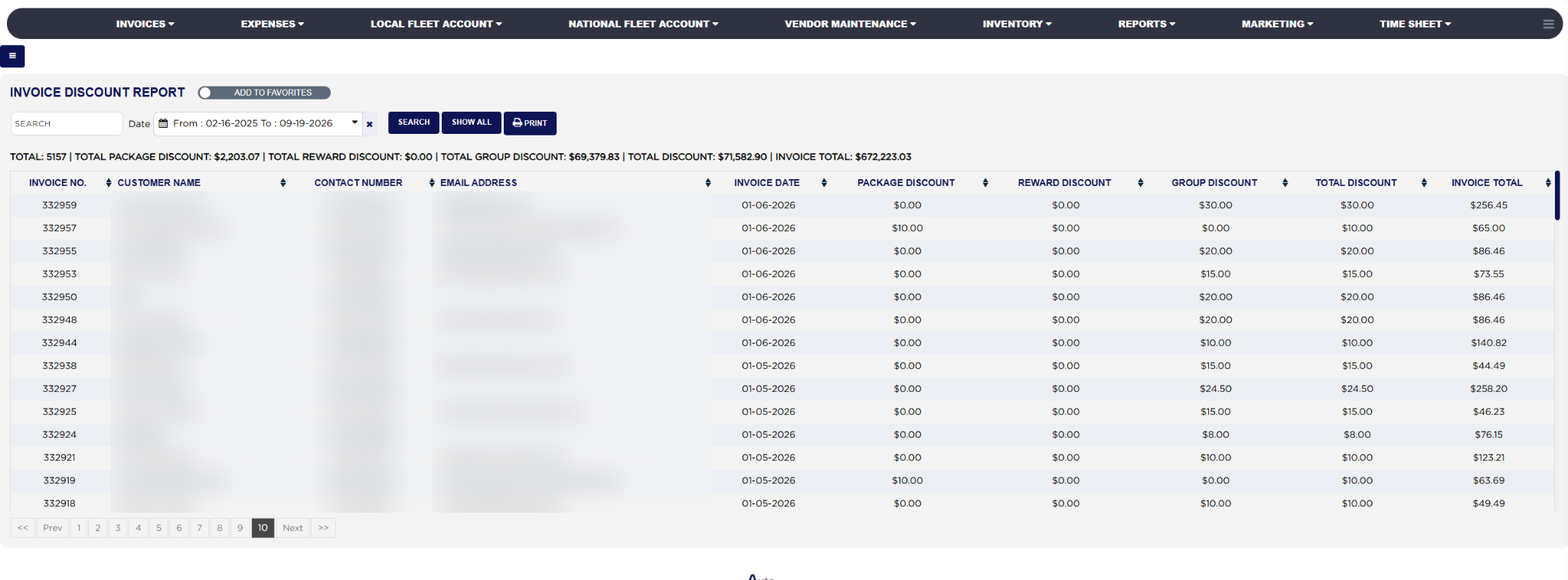
The Invoice Discount Report lists every invoice in a date range that carries a discount, one line per invoice, and splits the discount into the three kinds ARM gives: the package or coupon discount applied to the ticket, the rewards program amount redeemed, and the group discount given to a fleet or group customer on parts and labor. The totals line at the top adds each kind across the range and sets the total discount against the invoice totals. Use it to see how much the shop is giving away and in which form, to check that group customers are getting the agreed percentage and nobody else is, and to review the discounts given by the counter over a month.

2 how-to answers 1 screenshot Open in ARM Markdown

How do I run the Invoice Discount Report? #

  1. From the Home Screen, click Reports → Management & Operational Reports → Invoice Discount Report.
  2. Click the From : … To : … box beside Date and pick the invoice dates to include; the report reloads as soon as a range is chosen. It opens on the current month. The × clears the dates.
  3. To find one customer or invoice, type the start of the customer's name or phone number, or the full invoice number or e-mail address, into Search and click Search.
  4. Click Show All to clear the search and return to the current month.
  5. Read the totals line: TOTAL is the number of discounted invoices, then TOTAL PACKAGE DISCOUNT, TOTAL REWARD DISCOUNT, TOTAL GROUP DISCOUNT, TOTAL DISCOUNT and INVOICE TOTAL for the whole range.
  6. Click any column heading to sort by it; click it again to reverse the order. Long lists are split into pages with page links under the table.
  7. Click Print for a PDF copy in a new tab; the button appears only when the list has rows.
Invoice Discount Report with filters and results

How do I work out the total discount on a line? #

  1. From the Home Screen, click Reports → Management & Operational Reports → Invoice Discount Report, run it for your dates and pick one line.
  2. Take the PACKAGE DISCOUNT, the amount of the coupon or package discount applied on the invoice. Example: $10.00.
  3. Add the REWARD DISCOUNT, the value of rewards the customer redeemed. Example: $0.00.
  4. Add the GROUP DISCOUNT, the group customer's discount on the parts plus the discount on the labor. Example: $20.00.
  5. TOTAL DISCOUNT is the three together: $10.00 + $0.00 + $20.00 = $30.00, on an INVOICE TOTAL of $86.46 after the discount.
  6. The totals line at the top adds each of the three kinds across every discounted invoice in the range, so TOTAL DISCOUNT there is the month's discount bill and INVOICE TOTAL the sales it was given on.
About this screen

Each line shows the INVOICE NO., the CUSTOMER NAME, CONTACT NUMBER and EMAIL ADDRESS, the INVOICE DATE, the PACKAGE DISCOUNT (the discount or coupon applied to the invoice), the REWARD DISCOUNT (the rewards program amount redeemed on it), the GROUP DISCOUNT (the group or fleet customer's discount on parts and labor together), the TOTAL DISCOUNT, which is the three added, and the INVOICE TOTAL, the gross amount of the invoice. Every invoice with any discount is listed, drafts as well as finalized invoices, but not voided or deleted ones. The foot row sums the five money columns for the lines on the page.

The Add To Favorites switch beside the heading saves the report under Favorites on the Reports page. Which reports you see depends on your admin group permissions.
People also ask

  • asked 1×

Ask AI