ARM Help

Weekly Sales Journal Report

The Weekly Sales Journal Report (its heading reads WEEKLY SALES JOURNAL) is the week at a glance for the owner and the accountant: one column for each day from Sunday to Saturday of the week you pick, followed by the week, month-to-date, last 30 days, last 365 days and year-to-date totals. Four tables cover the week from different angles: what was sold by package, the revenue from gross sales down to gross profit and pay, what net sales is made of, and what was received by each payment method and deposited. Every figure comes from the invoices finalized on each day. Use it as the weekly management review, to hand the accountant the week's revenue and deposits in one sheet, and to compare a week with the month and the year so far.

3 how-to answers 4 screenshots Open in ARM Markdown

How do I run the Weekly Sales Journal Report? #

  1. From the Home Screen, click Reports → Management & Operational Reports → Weekly Sales Journal Report.
  2. Click the date box or its calendar icon and pick any day in the week you want; the report shows the Sunday to Saturday week that contains it and reloads as soon as the date is chosen. It opens on the current week, and a Loading Weekly Sales Journal bar shows while the figures are gathered. The × clears the date.
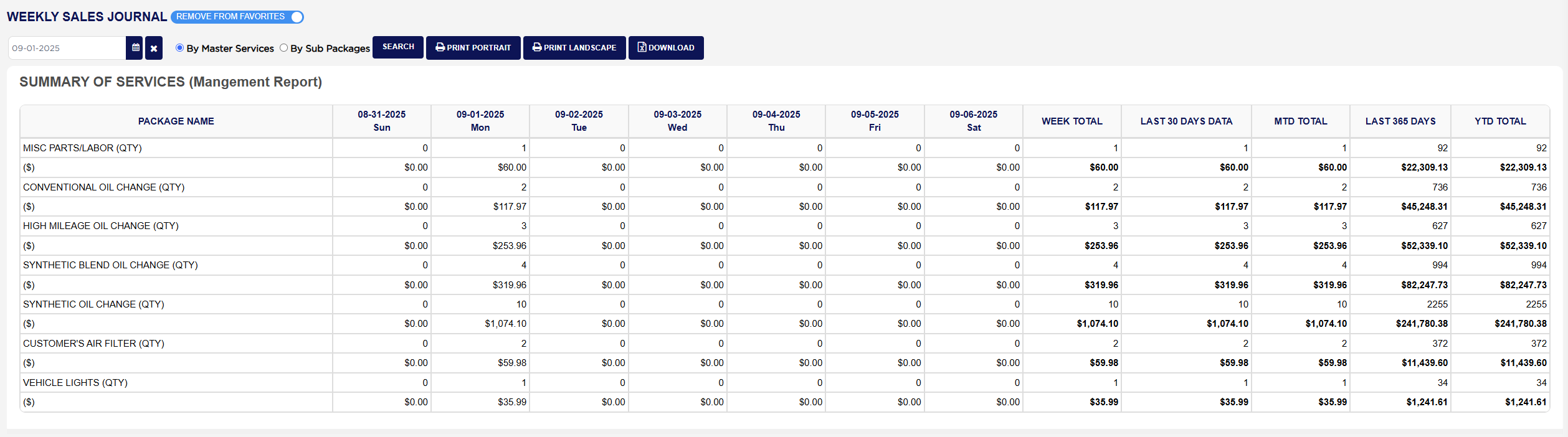
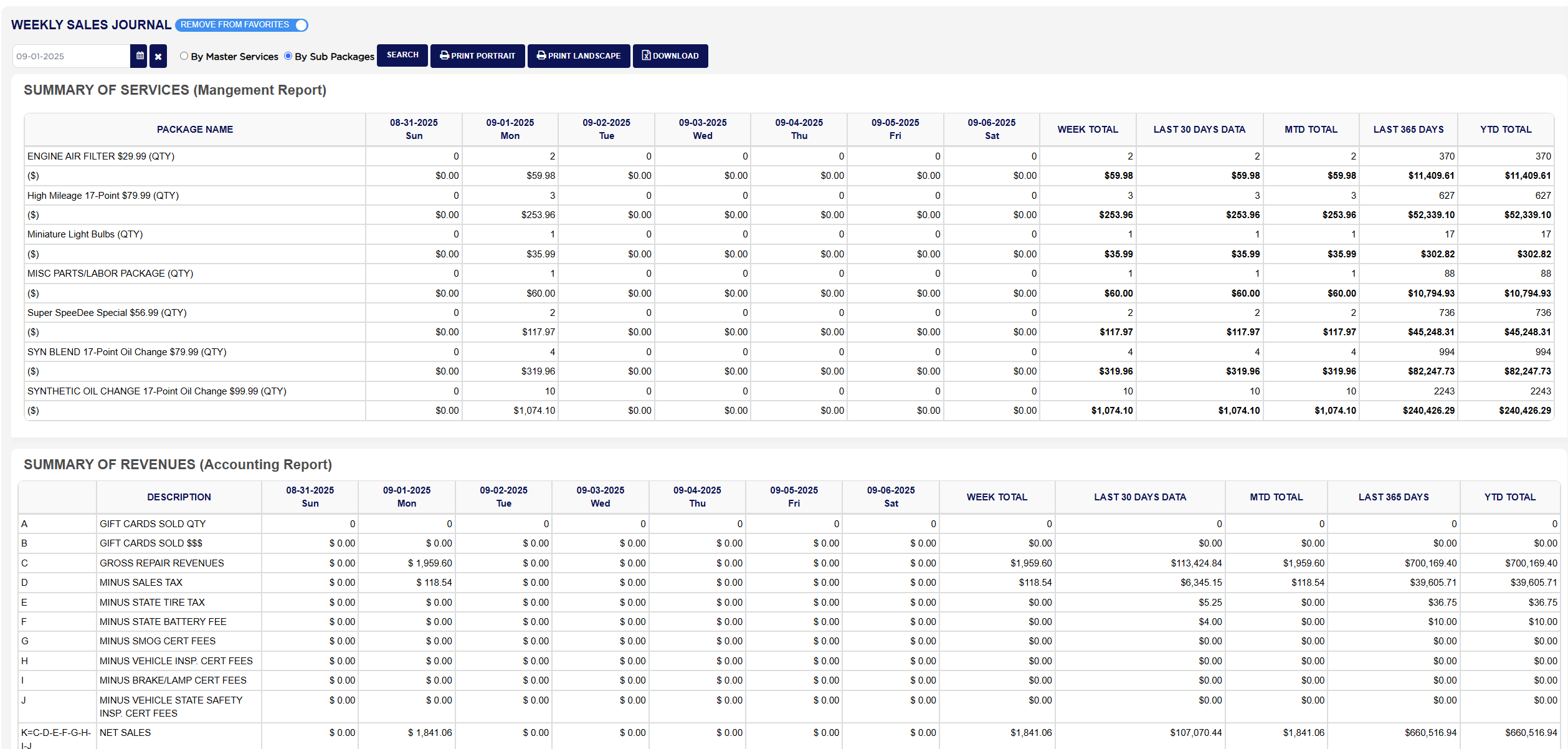
  3. Choose By Master Services to list the first table by package, or By Sub Packages to list it by the sub-packages sold inside them; the other three tables are the same either way.
  4. Click Search if you typed the date rather than picking it.
  5. Click Print Portrait for a PDF that flows the four tables one after the other, or Print Landscape for a wider PDF with each table on its own page; both open in a new tab.
  6. Click Download to save the four tables as they appear on the screen to a spreadsheet file.
Weekly Sales Journal Report with filters and SUMMARY OF SERVICES
Weekly Sales Journal Report By Sub Packages view
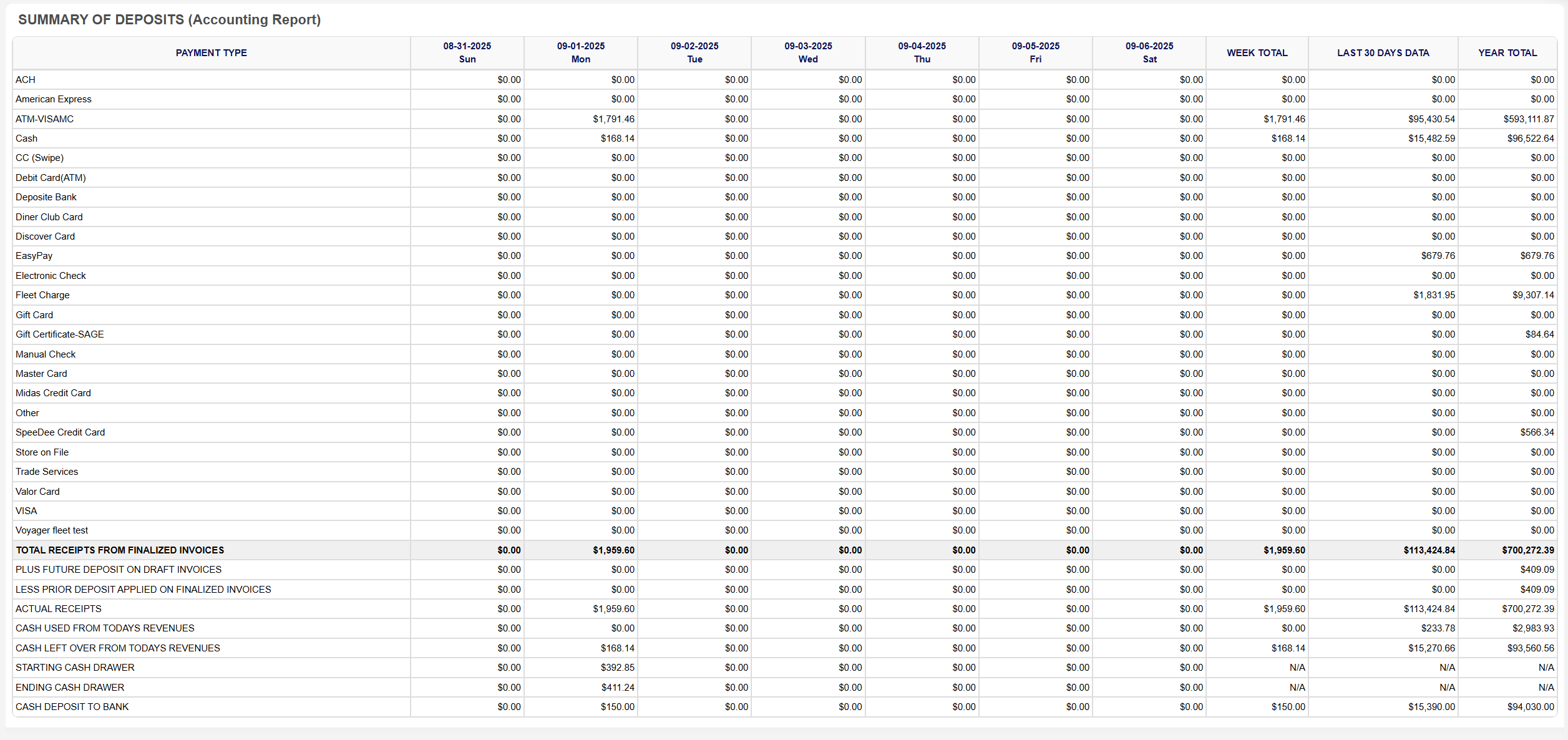
Weekly Sales Journal Report PAYMENT TYPE section

How do I follow the revenue table from gross sales to gross profit less pay? #

  1. From the Home Screen, click Reports → Management & Operational Reports → Weekly Sales Journal Report, pick a day in the week and read the WEEK TOTAL column of SUMMARY OF REVENUES (Accounting Report).
  2. Start at C GROSS REPAIR REVENUES, the gross sales of the week's finalized invoices. Example: $1,959.60.
  3. Subtract lines D to J, the sales tax and the state fees and certificates collected for others. Example: sales tax $118.54 and no fees, so K=C-D-E-F-G-H-I-J NET SALES is $1,959.60 − $118.54 = $1,841.06.
  4. Divide by L CAR COUNT for M=K/L TICKET AVERAGE. Example: 20 cars give $92.05.
  5. Add N COGS (INVENTORY) and O COGS (OPP) for P=N+O TOTAL COST OF GOODS, and take it off net sales for Q=K-P GROSS PROFIT. Example: $300.00 + $100.00 = $400.00 of parts, so gross profit is $1,441.06.
  6. V TOTAL PAY Q+R+S+T is the pay for the regular and overtime hours plus the sales and tech commissions. Example: $600.00, so W PAYROLL % is $600.00 ÷ $1,841.06 × 100 = 32.59%, and X GROSS PROFIT - TOTAL PAY is $1,441.06 − $600.00 = $841.06.
  7. If invoices were refunded in the week, AB NET SALES AFTER REFUNDS is K less AA NET SALES AMOUNT REFUNDED. Compare the same lines in MTD TOTAL and YTD TOTAL to see whether the week is above or below the run rate.
Weekly Sales Journal Report COMPOSITION OF NET SALES

How do I check the week's deposits against the receipts? #

  1. From the Home Screen, click Reports → Management & Operational Reports → Weekly Sales Journal Report, and pick a day in the week.
  2. In SUMMARY OF DEPOSITS (Accounting Report), read TOTAL RECEIPTS FROM FINALIZED INVOICES for a day, add PLUS FUTURE DEPOSIT ON DRAFT INVOICES and subtract LESS PRIOR DEPOSIT APPLIED ON FINALIZED INVOICES to reach ACTUAL RECEIPTS, the money that came in that day.
  3. Compare CASH LEFT OVER FROM TODAYS REVENUES with CASH DEPOSIT TO BANK for the same day; the difference is what stayed in the drawer or was over or short. The Daily Deposit Report shows the same day in more detail.
About this screen

SUMMARY OF SERVICES (Mangement Report) has one pair of lines per package sold in the week: … (QTY) counts the finalized invoices that included the package on each day, and ($) below it is the parts and labor charged for that package on those invoices. The day columns are headed with the date and weekday, and the totals columns are WEEK TOTAL for the Sunday to Saturday shown, LAST 30 DAYS DATA, MTD TOTAL for the month to the end of the week, LAST 365 DAYS and YTD TOTAL for the year to the end of the week. With By Sub Packages chosen the same lines are shown for each sub-package instead.

SUMMARY OF REVENUES (Accounting Report) is the lettered revenue statement, with a DESCRIPTION for each line and the same day and totals columns. A GIFT CARDS SOLD QTY and B GIFT CARDS SOLD $$$ count and value the gift cards sold, kept apart because a gift card is not a sale until it is used. C GROSS REPAIR REVENUES is the gross sales of the invoices finalized that day, and the lines D MINUS SALES TAX, E MINUS STATE TIRE TAX, F MINUS STATE BATTERY FEE, G MINUS SMOG CERT FEES, H MINUS VEHICLE INSP. CERT FEES, I MINUS BRAKE/LAMP CERT FEES and J MINUS VEHICLE STATE SAFETY INSP. CERT FEES are the tax and pass-through fees the shop only collects, so K=C-D-E-F-G-H-I-J NET SALES is what the shop actually earned. L CAR COUNT is the number of invoices and M=K/L TICKET AVERAGE the net sales per invoice. N COGS (INVENTORY) is the stock cost of the parts drawn from inventory for those invoices, O COGS (OPP) what was paid for parts bought outside for them, P=N+O TOTAL COST OF GOODS and Q=K-P GROSS PROFIT. The people lines follow from the time sheets and commissions: R TOTAL REGULAR HOURS, S TOTAL OVERTIME HOURS, T SALES COMMISSIONS, U TECH COMMISSIONS, V TOTAL PAY Q+R+S+T (the pay for the hours plus the commissions), W PAYROLL % of net sales and X GROSS PROFIT - TOTAL PAY. The refund lines count by the refund date: Y NUMBER OF INVOICES REFUNDED, Z TOTAL AMOUNT REFUNDED, AA NET SALES AMOUNT REFUNDED and AB NET SALES AFTER REFUNDS. AC COUPON AND DISCOUNTS is every discount given on the invoices, and AD FLEET PAYMENTS RECEIVED the payments received on fleet accounts that day.

COMPOSITION OF NET SALES (Accounting Report) breaks net sales into what the customer paid for: Total Parts After Discount, Total Labor After Discount, Shop Supply Fee, Hazardous Waste Fee, Oil Surcharge Fee, Electronic Transfer Fee, Tire Disposal Fee and Battery Disposal Fee, with Net Sales (Equals J above) as their sum, which matches the net sales line of the revenue table. Its totals columns are WEEK TOTAL, LAST 30 DAYS DATA and YEAR TOTAL.

SUMMARY OF DEPOSITS (Accounting Report) lists every PAYMENT TYPE the store has, such as Cash, VISA and Fleet Charge, with the money received by that method on the invoices finalized each day, shown on the day the invoice was finalized whenever the payment was taken. TOTAL RECEIPTS FROM FINALIZED INVOICES adds the methods. PLUS FUTURE DEPOSIT ON DRAFT INVOICES is money taken that day on invoices not finalized that day, LESS PRIOR DEPOSIT APPLIED ON FINALIZED INVOICES is the part of the day's receipts that had actually been collected on an earlier day, and ACTUAL RECEIPTS is the first line plus the second less the third, the money that really came in that day. CASH USED FROM TODAYS REVENUES is the cash paid out of the drawer for expenses that day and CASH LEFT OVER FROM TODAYS REVENUES the cash taken less the cash used. STARTING CASH DRAWER, ENDING CASH DRAWER and CASH DEPOSIT TO BANK come from the day's End of Day cash count; the drawer figures show N/A in the totals columns because a drawer balance is a snapshot, not a sum, while the bank deposits are added.

The Add To Favorites switch beside the heading saves the report under Favorites on the Reports page. The report also opens as WEEKLY SALES JOURNAL from the End of Day Report. Which reports you see depends on your admin group permissions.
People also ask

  • asked 1×

Ask AI